
Houzz Pro
Houzz Inc.Business
3.0194.00 Reviews
- Version
- 26.4.20
- Installs
- 100.00K
- Age Rating
- Everyone
Screenshots
Our Review of Houzz Pro
 Analysis by Appyee
When I use a business app on a job site, a good connection can make the difference between checking a detail quickly and having to hunt through messages later. That matters with Houzz Pro, a free business app from Houzz Inc. for professionals working in design and construction. Its mix of project tools and client-facing features makes it more specific than a general task manager, but the experience is naturally tied to moving information between people and projects.
I’d consider it when I want project details, estimates, payments, and design work gathered around the same professional workflow. It has a 3.1 average from around 1,400 ratings, so I would approach it with realistic expectations rather than assume every part will suit every business. It’s aimed at everyone by age rating, but its practical audience is people managing paid design or building work.
Where a connection matters most
The most useful network-dependent moments are the ones involving other people: sharing a photo, asking a client to choose between options, or checking whether a project detail has changed. Keeping those exchanges close to the work can reduce the familiar scramble through separate email threads and chat apps. The trade-off is that a unified workflow is only helpful if the people involved actually use it and can get to the information when they need it.
For a realistic example, imagine I’m visiting a renovation site and the client asks whether a proposed finish still fits the estimate. I can use a project-focused app to bring the relevant conversation and work into view rather than relying on memory. But if the site has weak reception, I would avoid promising an answer on the spot: I’d make a note of the question and follow up once I can reliably access the needed information. That small habit is more useful than assuming every app screen will be ready wherever I happen to be.
For quick, low-stakes coordination, a messaging app may still be faster, especially if a client already checks it constantly. Houzz Pro makes more sense when the conversation needs to stay connected to the wider job. I’d use it for decisions that affect scope, schedule, or cost, and keep urgent site instructions direct and unmistakable. A tidy project record is valuable, but it shouldn’t become a reason to delay a safety-critical or time-sensitive conversation.
Getting Started with Houzz Pro
First things first, setting up Houzz Pro is a breeze. The app is available on both Android and iOS, which is great because it means pretty much anyone can access it without fuss. Once you download it, the onboarding process is straightforward. The app guides you through setting up your profile, which is crucial for showcasing your portfolio to potential clients.
One of the things I really appreciated right off the bat is how intuitive the interface is. You don’t need to be a tech whiz to figure things out. Everything is neatly categorized, from project management tools to client communication features.
Features That Stand Out
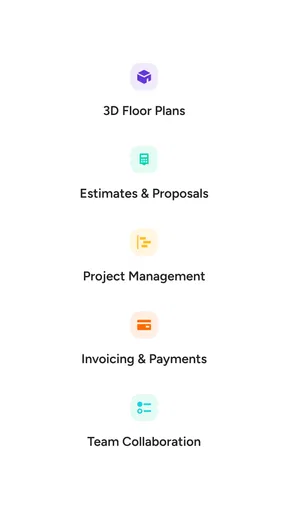
Now, let’s talk features. What makes Houzz Pro really shine is its comprehensive suite of tools designed specifically for professionals in the design and build industry.
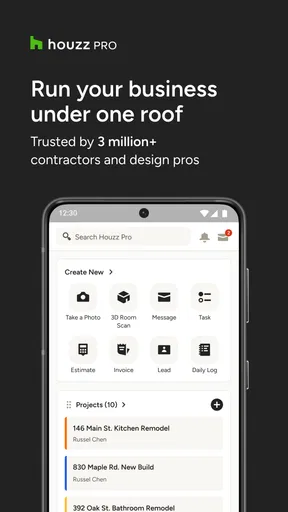
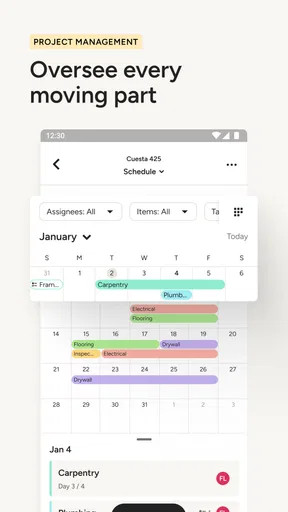
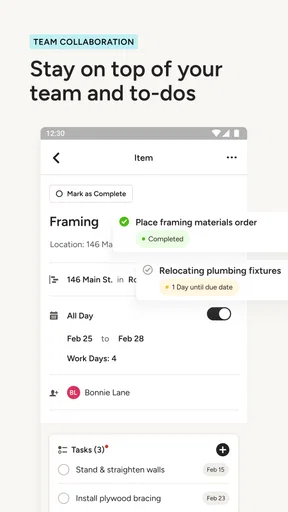
- Project Management: This feature is a lifesaver. You can easily track the progress of your projects, manage timelines, and even handle budgets. The dashboard gives you a bird’s-eye view of everything going on, so you’re always in the loop.
- Client Collaboration: Communication is key, right? With Houzz Pro, you can communicate with clients directly through the app. Share photos, discuss designs, and get feedback all in one place.
- Marketing Tools: If you’re looking to grow your business, the marketing tools here are top-notch. Create a professional website, run ad campaigns, and even manage social media posts. It’s like having a marketing team in your pocket.
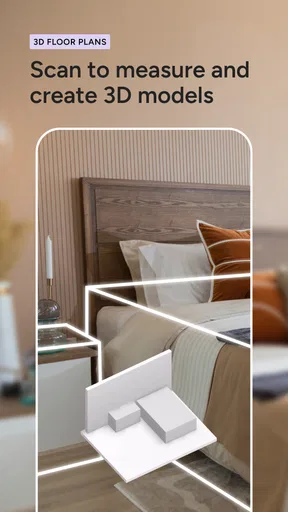
- 3D Floor Planner: Visualizing spaces accurately can sometimes be a challenge, but not with this tool. The 3D Floor Planner lets you create detailed floor plans that help clients see your vision.
Turning features into a practical workflow
In day-to-day use, I’d treat the app as a place to make project decisions easier to find, not as a substitute for every tool a business already depends on. For instance, a designer could prepare a client-facing visual, ask for feedback, then keep the resulting choice near the project’s other work. The non-obvious benefit is continuity: a decision is more useful when it can be understood later alongside the estimate or schedule it affects.
A helpful routine is to keep project names and client details consistent from the start. That makes a difference once several renovations or design jobs overlap, because a photo or note is only useful if I can tell which space it belongs to. I’d also make a habit of closing out a client conversation with a clear next step—such as who is deciding and what needs approval—rather than assuming a shared thread alone will keep the project moving.
Builders and designers who need a visual planning tool may value the floor-planning side more than someone whose work is mostly small repairs. Conversely, a solo contractor who mainly needs a simple checklist and calendar may find a lighter task app easier to maintain. Houzz Pro’s advantage is the combination of business and project functions; that breadth is also a trade-off, because a broad toolkit can take more attention to organize than a narrow app built for one job.
What’s the User Experience Like?
Using Houzz Pro feels seamless, thanks to its user-friendly design. Navigating through the app is smooth, with minimal lag, which is a huge plus when you’re juggling multiple projects. I found the tutorials and support resources really helpful, especially for getting up to speed with some of the more advanced features.
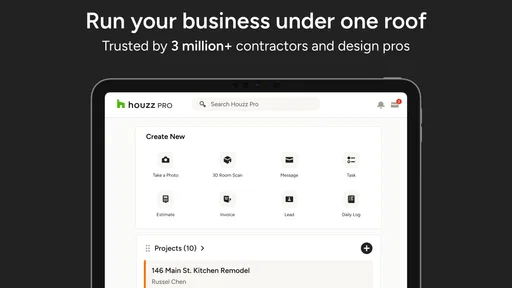
Another thing I loved is the ability to customize your dashboard. You can prioritize the tools and features you use most often, which means less time searching and more time getting things done.
Mobile work, interruptions, and recovery
On a phone, the strongest use case is checking or sharing project information while away from a desk: between appointments, during a client visit, or while walking a site with a customer. That convenience has limits. Detailed estimates, longer planning sessions, and carefully reviewing a design are often more comfortable on a larger screen, so I’d use mobile for quick decisions and reserve concentrated work for a setting where I can compare details without rushing.
Connectivity also changes how I’d handle interruptions. If a page takes too long to load or a response doesn’t appear, I wouldn’t repeatedly tap buttons or assume a payment, message, or project change went through. I’d check the current project state once the connection is steady, then retry only after confirming what actually happened. This is especially sensible for money-related actions, where duplicate attempts can create confusion even when the app itself is working as intended.
For data-conscious use, I’d be selective about sending large batches of photos while on a weak mobile connection and instead share them when I have a more dependable one. I’d also keep essential job details available through whatever dependable recordkeeping process the business already uses, particularly for same-day site decisions. That isn’t a criticism unique to Houzz Pro; it is a practical safeguard for any cloud-connected business workflow.
Who Is Houzz Pro Best For?
If you’re an interior designer, architect, builder, or contractor, Houzz Pro is definitely worth considering. The tools are tailored to meet the unique needs of these professions. Freelancers will find the client management and marketing tools especially beneficial, while larger firms might appreciate the project management capabilities.
Even if you’re just starting out in the industry, the app’s resources and community can provide valuable support and inspiration.
I’d be more cautious if my work involved very few clients, little need for visual presentations, or no interest in managing business tasks inside a dedicated platform. In that case, a basic combination of email, a calendar, and a simple project tracker may be faster and less demanding. Teams should also agree on where important updates belong; if one person records decisions in the app while others keep using separate channels, the intended shared picture can quickly become incomplete.
The app is free to start, while in-app purchases range from around $40 to $400 per item. I’d review the paid options against a concrete need—such as whether a particular tool would replace an existing step—before spending. Houzz Pro has more than 100,000 installs, and its current version is 26.2.12, with Android 6.0 as the minimum operating system. Those details make it easy to judge whether the app is a fit for a device and business, but the best test is still whether the workflow earns its place in the team’s routine.
Final Thoughts
In conclusion, Houzz Pro offers a robust set of features that can streamline your workflow and help you present your best work to clients. The app is designed with the professional in mind, making it easier to manage projects, communicate effectively, and market your services.
If you’re ready to take your business to the next level, give Houzz Pro a try. It might just be the tool you’ve been looking for to simplify and enhance your professional life.
And hey, if you decide to check it out, let me know how it goes! I’d love to hear your thoughts and experiences.
My connectivity verdict
I’d choose this app when I want project communication, planning, and client presentation to support one another, and when the people I work with are willing to keep the shared process current. I wouldn’t rely on a phone connection as the only way to retrieve a detail that could hold up a job, and I wouldn’t move a whole business into a new system without deciding how the team will handle urgent updates and records first.
Houzz Pro is most appealing to design and build professionals who can benefit from a connected, client-aware workflow rather than a bare to-do list. If that describes your work, it is worth exploring carefully and comparing the cost of any paid tools with the time they could save. If you only need a lightweight organizer, or often work where connectivity is unreliable and immediate access is essential, a simpler or more locally dependable setup may be the better choice.
Verdict
Strengths of Houzz Pro
- User-friendly interface simplifies navigation.
- Wide range of design templates available.
- Integrated project management tools.
- Client communication is seamless and efficient.
- Detailed analytics for business insights.
Limitations of Houzz Pro
- Limited offline functionality.
- Subscription plans can be pricey.
- Learning curve for new users.
- Occasional app performance lags.
- Limited customization for templates.
Other Releases by Houzz Inc.
View All
Houzz - Home Design & Remodel
House & Home4.6
Similar Picks in This Category
View All
LinkedIn: Community & Network
LinkedIn3.8

Zoom Workplace
zoom.com4.1

Microsoft Teams
Microsoft Corporation4.6

Meta Business Suite
Meta Platforms, Inc.4.6

Webex Meetings
Cisco Systems, Inc.4.5

TeamViewer Remote Control
TeamViewer4.4
Frequently Asked Questions
What features does Houzz Pro offer for design professionals?
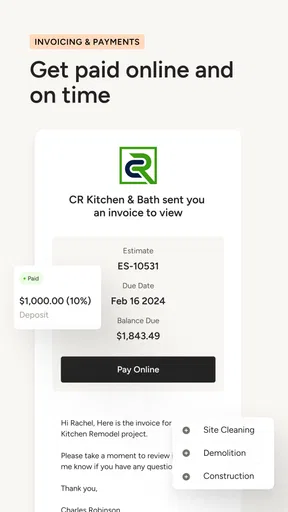
Houzz Pro provides a comprehensive suite of tools tailored for design professionals, including project management, client collaboration, and invoicing. The app also offers a 3D floor planner, mood boards, and a product sourcing platform, helping designers streamline their workflow and enhance client presentations. It's a one-stop solution for managing design projects effectively.
Is Houzz Pro suitable for small businesses or individual designers?
Yes, Houzz Pro is designed to accommodate both individual designers and small to medium-sized businesses. The app scales its features according to the needs of its users, offering flexible pricing plans. This makes it a valuable tool for freelancers and small firms looking to improve project management and client interactions without overwhelming overhead costs.
Can Houzz Pro integrate with other software tools I am already using?
Houzz Pro supports integration with several popular tools, enhancing its utility for design professionals. It can sync with accounting platforms like QuickBooks, email clients, and calendar apps. This ensures a seamless workflow by allowing users to manage various aspects of their business from a single platform, reducing the need for multiple apps.
How does Houzz Pro help with client communication and collaboration?
Houzz Pro facilitates robust client communication and collaboration through its built-in messaging and file-sharing features. Designers can share project updates, receive feedback, and collaborate on ideas directly within the app. This centralizes communication, ensuring that all project-related exchanges are organized and easily accessible.
What kind of customer support does Houzz Pro offer?
Houzz Pro offers comprehensive customer support, including tutorials, webinars, and a dedicated support team available via email and phone. Users can access an extensive knowledge base for troubleshooting and guidance. The support team is known for being responsive and helpful, ensuring users can resolve issues swiftly and continue their work with minimal interruptions.
